DreamLayer
A layer for smart AR glasses

DreamLayer

A memory layer for the real world.

Your glasses see what you see. DreamLayer remembers it, understands it, and hands it back the instant you need it — privately, on your own hardware.

What it feels like
What it feels like

The display is a place, not a stage.

No feeds, no pings, no screens to check. A card of light and glass surfaces on the rim of your sight the moment it's useful — then files itself away. Nothing pops; everything arrives.

01 / LOOK

Glance at a thing. Know it.

You look at the snake plant. A soft card: water every two weeks, last done Tuesday. A wine label — its region, and what you paid last time. Look → know, no phone out.

02 / MEET

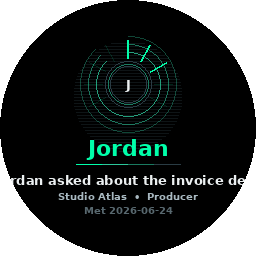
Never forget a name.

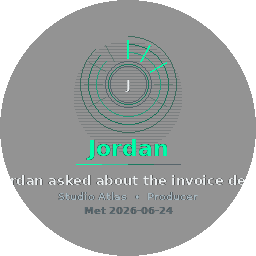
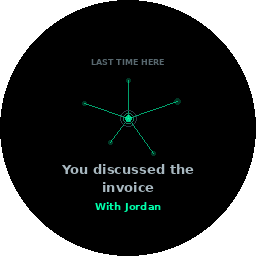
Someone says “Hi, I’m Maya.” DreamLayer keeps it automatically and starts a quiet dossier. Next time you meet, it greets you with her name, when you last spoke, and what about — you never blank again. A name is only ever kept from a real introduction. Faces are a separate, opt-in thing that is off until you install it — and if you also switch on auto-enrol, it keeps nameless faces nobody introduced. Nothing is ever looked up outside your own hardware.

03 / ASK

“Where did I leave the bike?” North rack.

Your ambient second memory has been quietly keeping what matters — objects, places, promises. Say “Hey Juno,” or just ask out loud. The answer often lands before you finish the question.

04 / KEEP

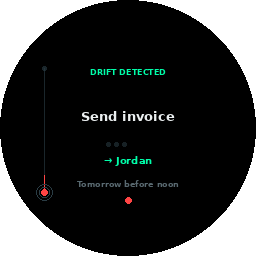
Promises drift to the rim and glow.

You promised Marcus the lease by Friday. As Friday nears, the promise drifts toward the edge of sight and starts to glow. You don’t forget. You never even had to write it down.

05 / READ

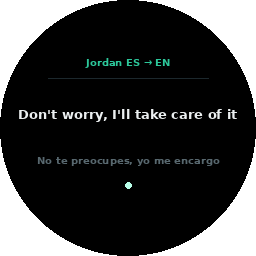
Every menu, in your language.

A menu you can’t read reads back in your own words, live, on your own hardware. Rosetta is the eye and the ear both.

See it move — the live renderer
The HUD, alive

See it move.

A live re-creation of how the display moves — drawn in your browser with the same palette and the same signature motion the glasses run: closed-form springs, flowing rim light, an answer that condenses in and files itself away.

Horizon.sim
The Horizon
Your day wakes with you
Aurora light flows along the rim; the now-notch beats at the top. Promises sit as embers at the edge, drifting closer as they come due.
Lucid Recall.sim
Lucid Recall
The answer is a place
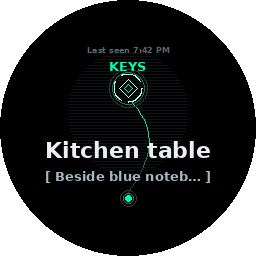
“Where are my keys?” The card shows where — the object as a jewel, a light trace down to you. It condenses in, breathes, then files itself away.
Saved Memory.sim
Saved Memory
One tap becomes a jewel
A spring-drawn check, a twelve-particle burst, concentric rings of light. Kept, and it feels kept.
Meridian Solid.film — renderer output, 256 px

every card above is real — the Meridian Solid pass, drawn by the shipping renderer, 256 px, one eye

Walkthrough — thirty seconds
In thirty seconds

Park it. Forget it. Ask.

The everyday loop — a glance, a nod, and it’s kept. Ask when you need it back, or just return: it resurfaces on its own the moment you’re near.

  1. 01
    SaveGlance at your spot, a quick nod — kept.
  2. 02
    AskHours later — “Hey Juno, where did I park?”
  3. 03
    RecallThe way back, on the rim of your sight.

Watch a full loop →

Capabilities — all real, all today
What it can do

A second memory, on your face.

Every one of these runs in the shipping codebase today — nothing on this list is a mock-up.

Environment illustrative · interface is real DreamLayer.
Never forget a nameAn introduction is kept the moment it’s given, and a dossier starts — next time, the glasses greet you with who they are, when you last met, and what about.
Live fact-checkA claim gets checked as it’s said — against what they told you before, and against the world through your Brain. Cached and run off-thread, so the verdict lands in time to answer, with the receipt.
Answer on the glassLook at a test question — any subject — and the answer appears. Look at a form and each field tells you exactly what to write; look at dense legal text and it comes back in plain words. You never pick a mode — the look decides which, and it learns the one you reach for.
Read the roomAsk, and the Truth Lens reads face, voice, and history together into one credibility gauge. Explicit — never running in the background.
Look → knowGlance at any object — the plant, the wine, the part — and a panel tells you what it is and what you know about it.
Never lose your thingsKeys, wallet, car, water bottle — anchored where you left them, recalled as direction and distance: “12 m to your left.”
Texts, hands-freeNew messages surface on the rim; answer by voice — “reply to Priya, on my way.”
“Hey Juno” everythingAsk, recall, locate, reply, brief, catch up on what you missed — the whole layer answers to one wake word.
Your morning, briefedWake to the day synthesized — agenda, messages, promises. Ask for the extended brief and it walks all of it, section by section, kept in the app to read anytime.
Works in airplane modeThe phone is the brain: capture, recall, object naming, and the consistency check all run fully offline. Incognito is one tap — or one “Hey Juno, go incognito.”
Find your peopleBond a group and, in a crowd, each of them lights the rim as a pulse at their bearing — nearer beats faster. Find your friends across a festival with no map and no “where are you.” Only bearing crosses, never a location.
Pick the best on the shelfLook at a whole shelf or menu and get the pick — ranked against your rules: what you avoid vetoed, your budget, then rating and price. Your rules stay on device; the world’s data rides the opt-in cloud.
The Six Lenses
The six lenses

The whole product, at a glance.

Everything DreamLayer does groups into six lenses. Underneath them all: the Privacy Veil, and Atmosphere — the ambient light and feel.

a WindowShade for each — click a title bar to unroll it

Memory

your life, remembered
Dream Mode · Ghost Layer · Lucid Recall · REM · Yesterlight · Premonition · Waypath
Dream ModeThe calm default — the glasses quietly sense your day without ever interrupting it.
Ghost LayerMemories echo in the places they happened — walk back in, and they’re there.
Lucid RecallAsk “where are my keys?” and the answer lands in a glance — including from your own files.
REMOvernight, the glasses replay and recombine your day — the dreaming is how memory settles.
YesterlightRoll your head back and the room replays its own light from earlier.
PremonitionYour routines shimmer just ahead of now — the 9 AM standup glows at 8:56.
WaypathDirection and distance to your own things: “keys, 12 m to your left.”

People

who’s around you — and never a blank
Social Lens · Timbre · Name Capture · Dossier — introductions first, and never a public database
Social LensRecognises the people you introduced and chose to keep. Face recall does nothing until you install the optional face pack, switch it on, and accept the biometric consent — and auto-enrol is a further switch, off by default: with it off, a face that matches nobody is discarded on the spot, never stored; with it on, the glasses also keep a nameless template for a face nobody introduced, so they can tell you you’ve seen this person before. Unnamed ones are dropped on your retention window unless you name them. Never a public database: matching only ever happens against the index on your own hardware.
TimbreFamiliar voices glow as waveforms at the rim of sight; strangers stay anonymous static.
Name CaptureSomeone introduces themselves out loud and the name is kept for you — automatically, no tap. Only self-introductions, never strangers; the Privacy Veil silences it like everything else.
DossierEvery name you keep grows a quiet dossier — when you last met, what you talked about, their last line, plus your own notes and tags. Next time you meet, the glasses greet you with it, so you never blank on a name again.

Truth

what’s true, and where beliefs come from
Veritas · Truth Lens · Candor · Provenance
Veritas — live fact-checkWhen a claim doesn’t hold up, a quiet verdict on the rim: green verified, amber check this, or red they said different before — with the basis, like an earlier “we settled at two million.”
Truth LensOutward: when you ask, a read on how credible what you’re hearing is. Explicit, never running in the background.
CandorInward: keeps your own story straight — “last week you said the deal closed at two million.”
ProvenanceBackward: trace any belief to who told you, when, and whether it held up since.

World

understand what you look at
Juno (look → know) · Label Lens · AI Brain · Rosetta · Scholar · TasteLens
JunoLook at anything and know it — the plant, the wine, the part number. Objects, never people.
Label LensYour own rules on what you’re holding: “you’re avoiding dairy,” “you returned this brand last year.”
AI BrainName and explain anything; ask your own files and mail. On-device first, your Mac mini next, cloud only if you switched it on.
RosettaThe eye and the ear: menus and signs you look at, read back in your language — and live captions as the other person speaks.
ScholarLook at a test question and the answer appears — any subject. Look at a form and each field says what to write; look at dense legal or technical text and it comes back in plain words. Reads through the Brain’s vision — local first, cloud only if you opted in — and never while the Veil is down.
The look decidesNo mode to switch. On a glance the Arbiter reads the scene and routes it — answer, fill, translate, or identify — firing the clear winner, offering a one-tap choice when it’s close, and learning the lens you prefer for a kind of view. Say “what’s the answer” or “how do I fill this” first and the very next look obeys.
TasteLensLook at a whole shelf or menu and get the pick — ranked against your rules: what you avoid vetoed first, then your budget, then rating and price. Your dietary rules stay on device; prices and reviews ride the opt-in cloud through a pluggable connector.

Life

do, keep, and build
Commitment Drift · Saga · Reality Compiler (Rehearsal + Wayfinding)
Commitment DriftPromises live on the display — they bloom, drift toward the rim, and glow as deadlines near. You don’t forget.
SagaThe same promises as a personal RPG: streaks, XP, and rescues for the ones about to slip.
Reality CompilerTeach a behaviour once — rehearse it or walk it — and a verified routine runs it on-glass forever.

Together

two wearers — or a whole circle — one sky
Confluence · GhostMode (a group) · the Beacon · shared futures · weather gifts
The bondTrade a short code with someone in front of you and your two glasses pair — explicit, mutual, revocable. It expires on its own in a few hours; either of you can dissolve it in a blink.
One entangled skyBonded, your two ambient auroras blend into a single shared weather. In sync, the sky settles seamless; drift apart and it splits down a visible seam — you feel how aligned you are with no word said. Only weather ever crosses: never speech, places, or names.
Silent pingsA discreet tap sends a pulse of light at their bearing across a room — “thinking of you,” “look here,” “let’s go.” No phone, no notification, no sound.
GhostMode — a whole circleThe bond, lifted to a group: a room, a hiking party, a crowd of friends share one sky. Same contract, one level up — only feeling crosses, everyone anonymous on the wire, your Veil silences your side.
The BeaconIn a crowd, each of your circle lights the rim as a pulse at their bearing — nearer beats faster and brighter. Find your friends across a festival with no map and no “where are you.” Only bearing crosses, never a location; you label who’s who only on your own glasses.
Shared futuresWhere both your rhythms already meet — the café you both drift to on Thursdays — a shared ghost lights on both horizons. Only scrambled place-hashes cross, so it works without either of you revealing where you go.
Duet rehearsalLearn a routine together — a dance, a drill, a two-person flow — as one shared figment. Either can correct any beat; each keeps a separately signed copy.
Weather giftHand a moment of your day across: your sunrise plays on their sky for thirty seconds, your palette, verbatim. A feeling passed hand to hand.
System Architecture
The architecture

Intelligence lives at the lowest tier that can do the job.

The phone names an object instantly and offline; a Mac mini on your LAN explains it richly from your knowledge; the cloud is only ever reached for the rare, hard, non-personal question — and only if you turned it on.

Tier 0 · BLE

Halo glasses

The display & sensors. A round HUD on the rim of your sight — the eyes of the layer.

Tier 1 · The hub

Your phone

Orchestrator, memory, and the privacy gate. The brain by default — instant, offline, yours.

Tier 2 · Your LAN

Mac mini Brain

A bigger local model plus your indexed files and mail. Never leaves the house.

Tier 3 · Opt-in

Cloud

Frontier reach for the hardest, non-personal asks. A switch you own — not a default you accept.

One code pairs the trio

Phone + Brain + glasses, scanned or pasted once. Nothing marked private ever leaves, in any configuration. Three ways in — unroll the shade.

Scan it FASTEST The Brain’s control panel shows a QR code; point your phone at it. One scan carries the Brain’s address, its access token, and your glasses’ identity in a single dreamlayer: code — the trio is paired before the coffee cools.
Paste it NO CAMERA NEEDED The same code works as plain text — copy it from the panel and paste it into the app. Byte-for-byte identical to the QR, so it also works over a message to yourself or from another room.
Skip it WORKS OUT OF THE BOX No Mac mini? You’re already set: the phone is the brain by default, glasses connect over Bluetooth, and everything runs offline. Add a Brain any time later — same one code.
The Software — two apps you can run today
The software you run

Two apps you can run today.

Both testable now, before the glasses ship. The phone app — built for iOS and Android — pairs your devices and puts your brain in your pocket; the Brain app turns a spare Mac or Windows PC into a private knowledge node on your own network.
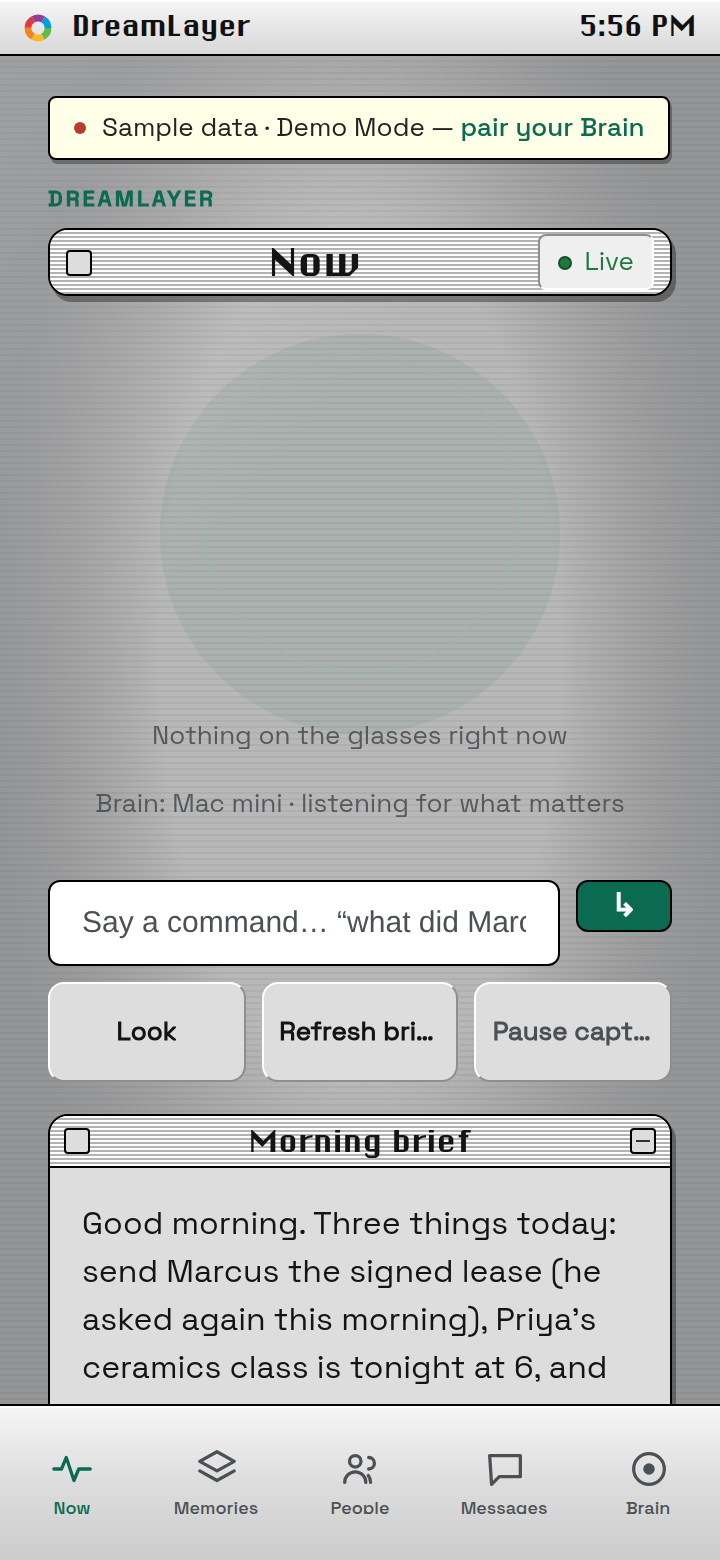
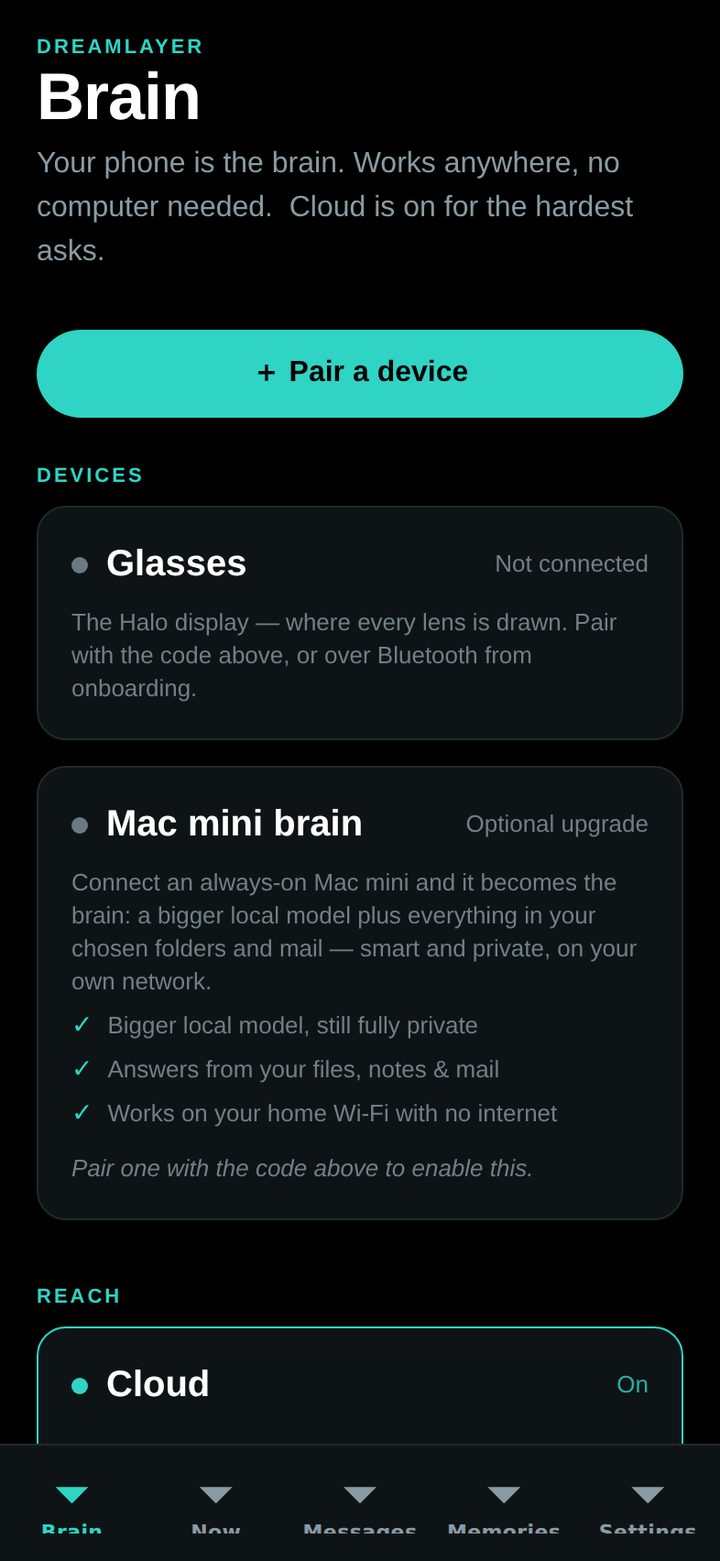
The DreamLayer phone app — the Now dashboard, in the Platinum design
iOS & Android

Your brain, in your pocket

Pair the trio with one code and own your privacy from a single screen — phone-first, cloud a switch you hold. One codebase, both platforms; not on the App Store or Play yet — early access gets it first.
  • Ask from anywhere. “What does Marcus owe me?” answered from your own memory, not a search box.
  • Three switches, one screen. Phone-or-Mac brain, cloud on/off, and Incognito — flip capture and the cloud off for a whole session with one tap.
  • Mirrors the glasses. See the card that’s on the HUD right now, and manage the memories and people you’ve kept.
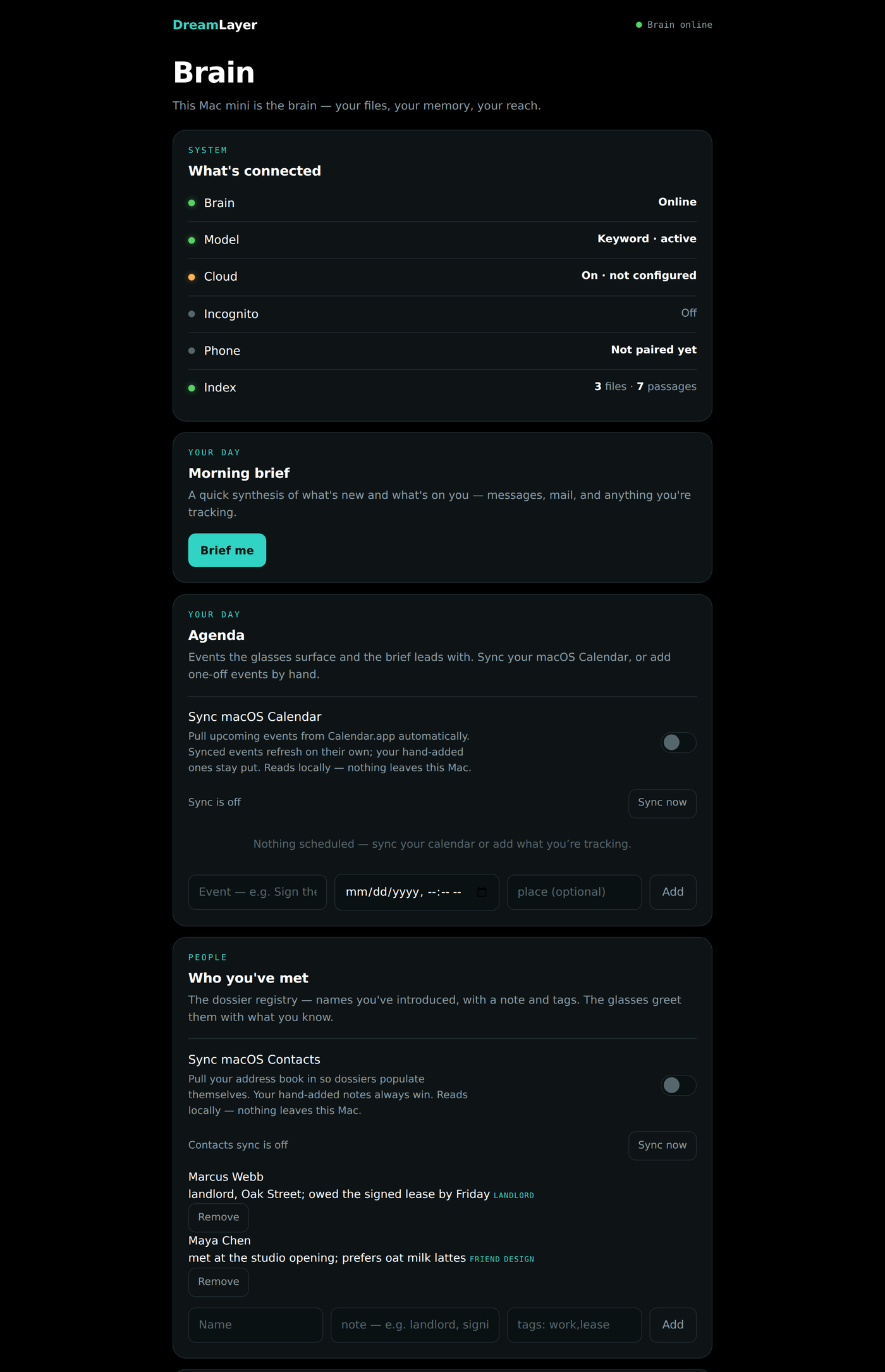
DreamLayer Brain — Control Panel
The DreamLayer Mac Brain control panel
Mac & Windows · the Brain

A private knowledge node

Point it at a spare Mac or Windows PC and it becomes the smart, private half of your brain — indexing your world and serving it back, all on your own network.

  • Morning brief. One tap synthesises what’s new and what’s on you — across your messages, mail, and everything you’re tracking.
  • Knows your day & your people. Reads macOS Calendar, Contacts, and Reminders — on Windows, Thunderbird mail and .ics calendars — so the glasses greet who you’ve met and surface what’s due. Read-only, nothing leaves.
  • Answers from your files. Index chosen folders and mail; keyword search needs zero setup, and a local model adds written answers and vision — no cloud required.
Privacy Veil

One gesture. Fully deaf and blind.

Not a mute icon — an architecture. Nothing seen, heard, or kept until you lift it. And underneath: no face lookup outside your own hardware, no voice cloning, no covert recording. Deliberately not built. Face recall itself is built — opt-in, off by default, behind a biometric consent, and with auto-enrol on it stores faces nobody introduced. We say so on the privacy page rather than here.

on-device by default meaning, never recordings no public face database — ever one gate, honored everywhere
Open Platform — Apache-2.0
An open platform

Build on the layer.

DreamLayer is open source — Apache-2.0, the whole stack — and every lens is a plug-in underneath. Write a new one — a lens, a controller, a connector — and it drops into the same machinery the built-ins use. There’s a store for what the community makes.

A real extension APIObject providers, glance lenses, brain tiers, card renderers — the registries the app already runs on, given one doorway. First-party features are built through it too, so it’s proven by use.
Validated before it runsEvery plugin clears a gate — integrity checksum, a capability scan that blocks anything it didn’t declare, and a smoke test — on install and on load. It only gets the access it asked for, and only what your device will grant.
A store to share itBrowse, rate, and install from the web, the phone, or the Mac. Contribute yours by pull request; it’s reviewed and checksummed before it lands. Easy on, easy off.
Halo Simulator — live
Try it without glasses

Run the whole thing in your browser.

The Halo Simulator is DreamLayer with the hardware drawn in software — the real stack, ported to run right here. No terminal, no install. Talk to Juno, set a timer that actually counts down on the glass, introduce someone and have them recognised, drop the Privacy Veil. Only the glasses are simulated.

Live · running now

This glass is the in-browser simulator, playing itself. Every pixel is drawn by a faithful port of the device renderer — the same voice grammar, Social Lens recall, and Figment timer stage the real stack runs.

Juno is warming up…
The real loop, end to endYour typed line is the transcript the mic would deliver; it runs the full “Hey Juno” surface — commands, learned facts, every intent, native timers, Social Lens. The same code that will run on the glasses runs here.
Talk, look, tapSay a command, pick a face to look at, tap or hold the temple, veil it. Introduce “my colleague Sarah” and a later glance greets her by name — with the relationship, your notes, and any favour owed.
Not a mockupThe display streams from the device renderer, the timer counts down on the reference Figment stage, and the Privacy Veil blacks the whole loop out for real. If it works in the simulator, it works on the glass.
No terminal — get the Brain app

The same Orchestrator + Figment stage, packaged for both desks: a signed, notarized menu-bar appliance on the Mac, and a system-tray appliance with a per-user installer on Windows. Same panel, same privacy.

Download for Mac ↓ Apple Silicon · notarized Download for Windows ↓ per-user installer · no admin
MPW Shell — prefer the terminal? one command
# the real Orchestrator + Figment stage, served to your browser
pip install -e "host-python[dev]"
python -m dreamlayer.simulator
Web BLE Playground
No app store required

Poke the HUD from your browser.

Because the whole thing is open, you can talk to the glasses straight from a web page — no build, no install. The playground connects to your Halo over Bluetooth and speaks Lua to it: push a card, run a gesture, read the IMU, live.

A live Lua REPLType Lua, hit send, watch it run on the glass — replies stream straight back. The fastest way to learn the on-device API and prototype a card.
Canned demosOne-tap buttons — show text, clear, read the battery — over the Nordic UART service the phone hub uses. See the HUD react without writing a line.
Honest about the caveatWorks in Chrome or Edge on Android, macOS, Windows, and Linux. iPhone Safari can’t do Web Bluetooth — there, use the app. The page tells you plainly instead of failing silently.
How is this even possible?
The question everyone asks

How is this even possible?

The display is only 256 px, and that throws people. So here is the short version: the display is not the computer. It is just the window one glanceable answer comes out of.

Its whole job is to show a single card: a name, a fact-check, one translated line, an arrow toward a friend in a crowd. You are not reading a webpage in your eye. You are catching a one-second cue and looking back at the world. 256 px is plenty for a few lines of crisp text and a glyph.
Off the glasses. Perception, memory, and the models live on your phone or a home Brain (Mac or PC), local-first, cloud optional. The glasses capture what you see and draw the finished card back over Bluetooth. Heavy compute to the host, glanceable pixels to the device.
It stores structured meaning, never raw photos or audio. One gesture, the Veil, visibly stops all capture, and a memory cannot be written while it is down. Personal details are redacted before anything is saved.
Every HUD pixel in the demos is genuine output of the shipping renderer at the real 256 px, not a mockup. The whole flow runs and is tested against an emulator today. Pre-hardware, no ship date, early access only.
Yes. It is an open platform, not a closed app — the code is Apache-2.0. Every feature is a lens running through one plugin API, and you can write your own without touching the core. A plugin only gets the capabilities it asks for, and shared plugins pass a validation gate first.
Halo is the first target because that is the hardware this build is written against. But the device sits behind a thin, typed bridge, so any capable glasses are a future target. The intelligence layer does not care what is drawing the pixels.
Coming Soon
Built for Brilliant Labs Halo

Coming soon.

DreamLayer ships first on the Brilliant Labs Halo — currently the only glasses capable of running it. More devices as they catch up. Be there when the layer wakes.


Be first when the layer wakes — one note when it’s ready, nothing else.